IMAGE RESOLUTION GUIDE
DPI vs PPI: what 72 vs 300 actually changes
A “300 DPI” tag is not proof of a high-resolution image, and a “72 DPI” tag is not proof of a low-resolution one. Actual pixels, the final print size, and any crop determine effective image resolution.
The short answer
PPI means pixels per inch and connects a digital image’s pixels to its printed size. DPI means dots per inch and describes physical printer output. When a service requests a “300 DPI image,” it usually wants enough source pixels to supply 300 PPI at the final print size—and sometimes a 300 PPI metadata tag as well.
Changing an embedded value from 72 to 300 does not add pixels. Calculate effective PPI from the pixels that will actually be printed: pixels ÷ print inches on each edge.
Are PPI and DPI the same thing?
No. They describe different parts of the printing process, even though “DPI” is often used informally for both.
| Term | What it counts | What to check |
|---|---|---|
| PPI | Image pixels per printed inch | Actual pixel dimensions ÷ intended print inches |
| DPI | Printer ink or toner dots per inch | Printer or print-provider settings |
A printer may use multiple physical dots to reproduce one image pixel. For image preparation, focus on pixel dimensions and PPI; the printer or print provider controls device-specific DPI settings.
Two files that prove the tag is not the quality
Both examples are placed at 12 × 8 inches. Their embedded labels suggest the opposite of what their actual pixels provide.
PPI = pixels ÷ inchesprint inches = pixels ÷ PPI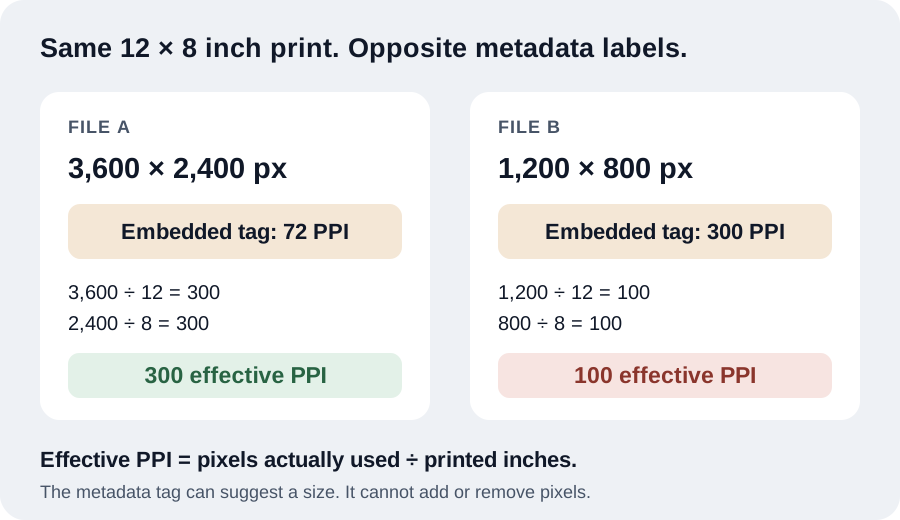
Example A: tagged 72, but effectively 300 PPI
A 3,600 × 2,400 pixel file tagged 72 PPI is printed at 12 × 8 inches. Width: 3,600 ÷ 12 = 300 PPI. Height: 2,400 ÷ 8 = 300 PPI. It supplies 300 effective PPI on both edges despite its 72 PPI tag.
Example B: tagged 300, but effectively 100 PPI
A 1,200 × 800 pixel file tagged 300 PPI is printed at 12 × 8 inches. Width: 1,200 ÷ 12 = 100 PPI. Height: 800 ÷ 8 = 100 PPI. Its tag says 300, but it supplies only 100 effective PPI at that size.
How to check resolution for the print you will make
- Choose the final printed width and height. Use the image area, not automatically the full paper size.
- Account for crop or borders. If the image will be cropped to fill, use the pixels remaining after the crop. If borders make the image smaller than the sheet, use the image’s actual printed dimensions inside those borders.
- Divide pixels by inches on both edges. The lower result is the limiting effective PPI. The DPI/PPI Checker can read the file and calculate this for a planned size.
- Compare with the provider’s requirement. Around 300 PPI is a common close-viewed target, but it is not universal. Follow the print provider’s specification.
- Inspect the image itself. Adequate pixels cannot fix missed focus, motion blur, compression artifacts, or poor source detail.
Need pixel requirements for a specific size? Use the print calculator. For a compact reference, see the common print-size pixel chart.
Which PPI target should you use?
- 300 PPI: a common target for photographs, books, and artwork viewed up close.
- 240 PPI: often excellent for photo printing while allowing a slightly larger print.
- 150 PPI: often workable for posters and large displays viewed from farther away.
Always follow the requirements of your print provider when they specify dimensions, resolution, color, bleed, or file format.
When is a metadata-only DPI change appropriate?
A metadata-only change can be useful when the file already contains enough pixels and:
- layout or print software should open the image at a particular initial physical size;
- a print lab or submission system explicitly requires a 300 PPI tag; or
- you need to correct a missing or inaccurate print-resolution instruction without re-encoding the image.
Use the DPI/PPI Changer for that job. It changes the supported resolution metadata without resizing the pixels. This is different from resampling: resampling changes pixel dimensions, while changing the tag does not create detail.
Does 72, 96, or 300 PPI matter on a screen?
Usually not. Websites and apps generally lay out images using their pixel dimensions and CSS display size. Device pixel density affects how hardware renders those pixels, but an embedded 72, 96, or 300 PPI tag normally does not control how many pixels a browser displays.
For the web, choose suitable pixel dimensions, file format, and file size. For print, connect those pixels to physical inches.
COMMON QUESTIONS
DPI and PPI FAQ
What does 300 DPI mean for a digital image?
In most image-submission instructions, “300 DPI” means enough source pixels to supply 300 pixels per inch at the final printed size. True printer DPI describes physical ink or toner dots.
Is a 72 DPI image always low resolution?
No. The 72 value may be only an embedded print-size instruction. A 3,600 × 2,400 pixel file has enough pixels for a 12 × 8 inch print at 300 PPI even if its metadata says 72.
Does changing 72 DPI to 300 DPI improve quality?
No. A metadata-only change does not add pixels, sharpen the image, or recover detail. It changes the suggested physical size used by software that reads the tag.
How do I calculate effective PPI?
Divide the pixels used on each edge by that edge’s printed inches. Calculate width and height after any crop; the lower result is the limiting effective PPI.
Does DPI affect image size on a website?
Usually no. Web layout uses pixel dimensions and CSS sizing; an embedded 72, 96, or 300 PPI tag normally does not control how many pixels a browser displays.
CHECK YOUR FILE
See the pixels and embedded resolution
Use PixGauge to read a JPG, PNG, or WebP locally, compare its metadata with its actual pixels, and calculate effective PPI at the size you plan to print.